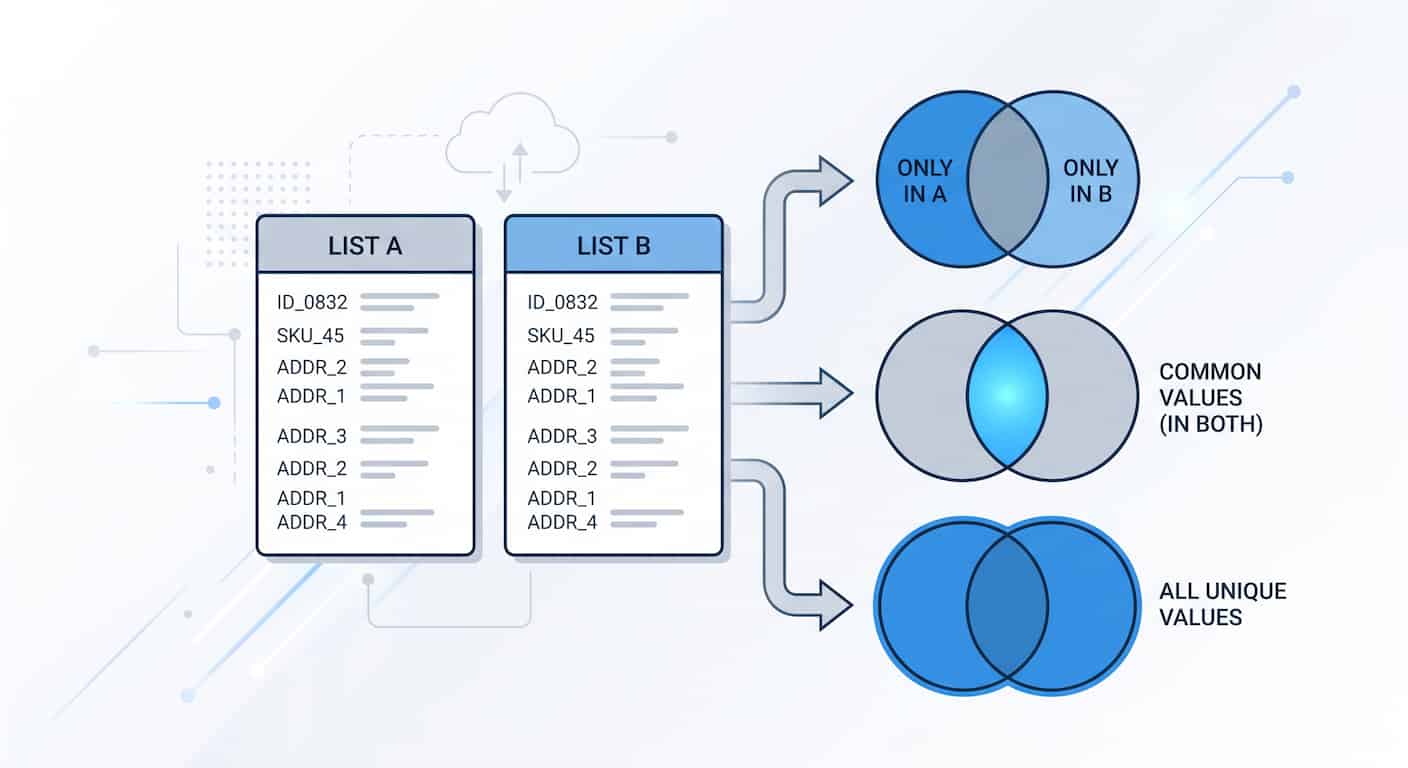
Data reconciliation is a quiet, tedious task that keeps businesses running. Whether you are an e-commerce manager auditing a massive inventory of SKU numbers, or a developer verifying a database migration of user IDs, mismatched lists can cause catastrophic errors. If an item exists in one system but is missing from another, you need to know about it immediately.
Finding missing items and extracting unique values manually is nearly impossible when dealing with hundreds or thousands of rows. While spreadsheets offer formulas, they are slow and prone to human error. Utilizing a dedicated online list comparison tool provides a visual, instant, and accurate way to cross-reference CSV columns, text files, and raw data lists to find exactly what is missing.
Understanding List Differences in Data Analysis
Before you begin comparing datasets, it is important to understand the terminology of data reconciliation. When you compare two lists (List A and List B), the output can be categorized into distinct groups. Knowing which group holds the answer to your problem is half the battle.
1. Missing Items (Only in A / Only in B)
This is the most common requirement. "Missing items" refers to data points that are present in one list but completely absent from the other.
- If you want to know what List A has that List B lacks, you look at the "Only in A" results.
- If you want to know what new data List B brought in that List A doesn't have, you look at the "Only in B" results.
2. Common Values (In Both)
Also known as the intersection, this represents the data that matches perfectly across both lists. Finding common values is essential when you need to verify that a core set of items survived a system transfer or when finding overlapping characteristics between two different data sources.
3. Unique Values (All Unique)
Sometimes you don't care about the differences; you just want to combine the lists into one massive database without any repeating entries. The "All Unique" output merges List A and List B, strips out all overlapping duplicates, and provides a clean, unified dataset.
4. Internal Duplicates (Duplicates A / Duplicates B)
A major cause of mismatched lists is internal corruption—meaning List A has the same item listed three times. A robust data tool won't just compare A to B; it will audit A against A, and B against B, to warn you of dirty data within your source files.
Key Use Cases for Finding Missing Items
Different industries rely on list comparison to maintain operational integrity. Here are the most prevalent scenarios.
E-commerce and Inventory Management
If you run an online store, your website software (like Shopify or WooCommerce) has a list of active Product SKUs. Meanwhile, your physical warehouse management software has its own list of SKUs. By comparing the Website List (List A) with the Warehouse List (List B), you can instantly spot critical errors. If a SKU appears in "Only in A", you are selling a product online that doesn't exist in your warehouse (leading to fulfillment failures). If a SKU appears in "Only in B", you have physical stock gathering dust that isn't listed for sale online.
IT and Database Migrations
When web developers migrate a website to a new server or update a database, they must ensure no data was lost. They will export a CSV of all User IDs or Image URLs from the old database, and a CSV from the new database. By finding the "Missing Items," developers can instantly pinpoint which specific database rows failed to transfer during the migration and manually patch them.
SEO and Content Audits
SEO professionals frequently work with massive lists of URLs. If an SEO analyst crawls a website and finds 5,000 URLs (List A), but Google Search Console only reports 4,200 indexed URLs (List B), they need to know exactly which 800 URLs are missing. Comparing the lists reveals the "Only in A" URLs, allowing the analyst to investigate why Google is ignoring those specific pages.
Email Marketing and CRM Hygiene
Marketers apply the exact same logic to subscriber data: cross-referencing an outreach list against a suppression list, merging lead sources without duplicates, and catching contacts about to receive the same campaign twice. That workflow has its own dedicated guide — see how to compare customer email lists online.
How to Find Unique and Missing Values Online
You don't need to write Python scripts or complex SQL queries to find these differences. A browser-based tool can process this data in seconds.
Step 1: Format Your Data
Ensure your data is clean. If you are comparing SKUs, make sure it is just a list of SKUs (one per line). If you have an entire spreadsheet, isolate the specific column you want to compare and copy it, or save it as a simple text or CSV file. If your data lives in Excel and you keep fighting broken lookup formulas, the dedicated guide on comparing two Excel columns without formulas covers that workflow step by step.
Step 2: Input Your Datasets
Navigate to the list comparison tool. Paste your baseline data into the "List A" input field. Paste your secondary data into the "List B" input field. If you are using files, simply upload .txt, .csv, or Excel (.xlsx) directly.
Step 3: Let the Engine Process
Hit compare. The tool uses an optimized algorithm to sort, match, and categorize every single line. It handles thousands of lines almost instantly, circumventing the lag you typically experience in heavy spreadsheet applications.
Step 4: Export Your Targeted Results
Click through the interface tabs to find the exact data you need:
- Click Only in A to find what dropped off in List B.
- Click In Both to verify successful transfers.
- Click All Unique to grab your newly merged master list. Simply copy the text from the relevant tab and paste it back into your project management software, database, or email.
Secure Data Comparison: The Privacy Factor
For IT professionals, developers, and e-commerce managers, data security is paramount. A list of internal database IDs, proprietary product SKUs, or secure system URLs is highly sensitive information. Uploading this data to a third-party server to run a simple comparison is a severe security risk.
That is why the architecture of our tool is strictly 100% Client-Side.
When you use the tool to compare CSV columns or text lists, the Javascript engine running inside your own browser does all the heavy lifting. The data never pings an external server, and no records are saved. You get the computational speed of a web application while maintaining the airtight security of an offline desktop environment. Your proprietary inventory lists and database architectures remain entirely your own.
Frequently Asked Questions
How do I find missing items between two lists?
Place your master list in the "List A" field and your secondary list in the "List B" field of the comparison tool. Once processed, click on the "Only in A" output tab. This will display all the items that are present in your master list but missing from the secondary list.
What is the fastest way to compare CSV columns?
Instead of opening CSV files in Excel and writing VLOOKUP formulas, upload the two CSV files directly into an online list comparison tool. The tool will parse the columns and instantly categorize the data into matches, differences, and unique values.
How do I extract unique values from two lists?
If you want to combine two lists and remove all duplicates, paste them into the tool and run the comparison. Then, select the "All Unique" output. This provides a clean, deduplicated master list containing every unique item from both List A and List B.
Can I find duplicate values within a single list?
Yes. While the main function is comparing List A against List B, the tool also audits each list individually. By checking the "Duplicates A" or "Duplicates B" tabs, you can see if you have repeating values within your own source files before you even cross-reference them.
Is it safe to compare proprietary SKU or database lists online?
Yes, provided the tool does not upload your data to a server. Our tool uses 100% client-side processing, meaning the comparison logic runs locally in your web browser. Your sensitive data is never transmitted across the internet or stored in a database.
Does the tool handle blank spaces or empty lines?
Empty lines are ignored automatically, so pasting a spreadsheet column with gaps in it works fine. For leading and trailing spaces, enable the "Trim Whitespace" option before comparing — this makes "Item1 " and "Item1" correctly register as a match instead of a false mismatch.
What formats can I upload to find missing values?
You can directly paste raw text copied from any source, or upload .txt, .csv, and Excel (.xlsx) files. The tool will read the lines or rows and compare the datasets seamlessly.