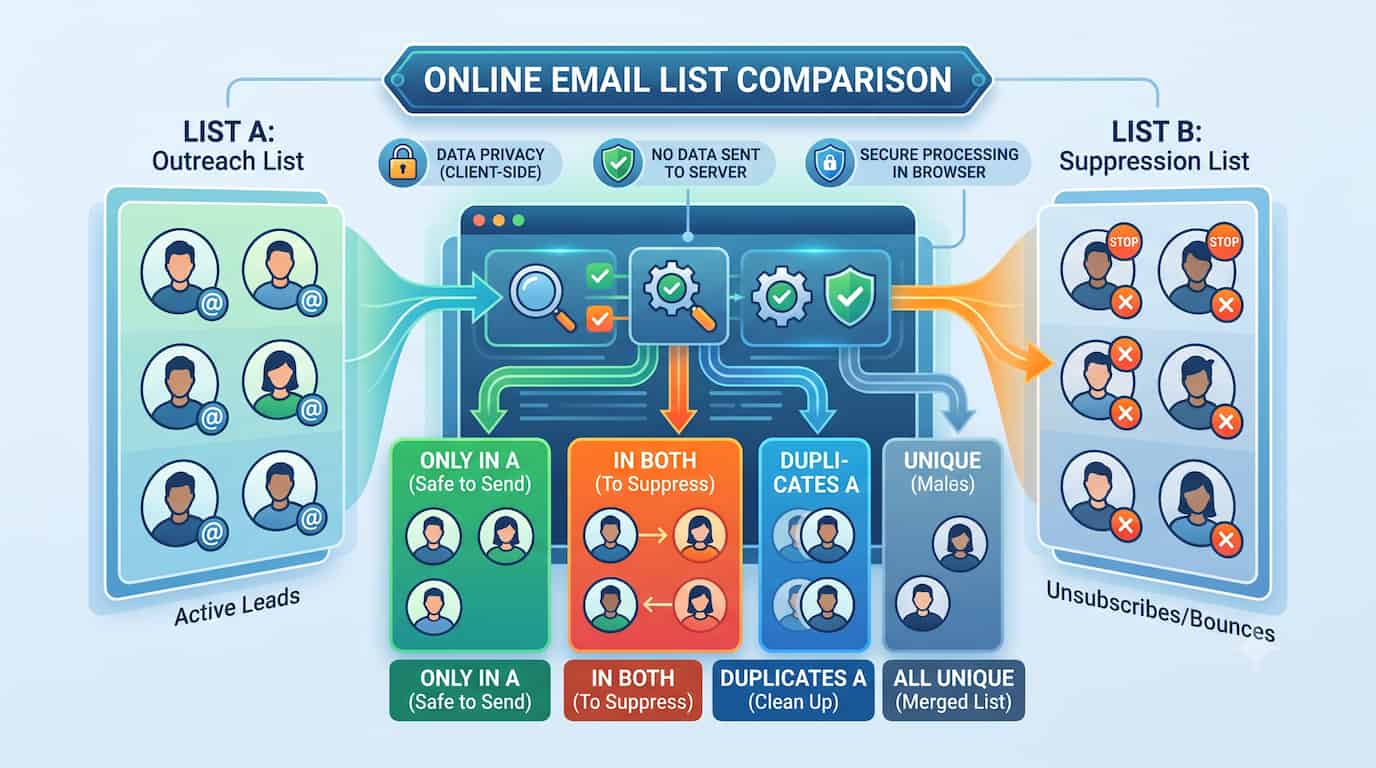
Your email list is one of the highest-leverage assets in any digital marketing operation. But a list is only as good as its hygiene. Over time, databases accumulate duplicate contacts, overlapping campaign segments, unsubscribed users, hard bounces, and spam complainants. Sending to a contaminated list does not just produce poor campaign metrics—it actively degrades your sender reputation, inflates your ESP costs, and exposes you to legal liability.
Comparing email lists—cross-referencing one against another to find overlaps, differences, and duplicates—is a task that every email marketer runs regularly. The problem is that most people attempt this in Excel using VLOOKUP or conditional formatting, and immediately run into invisible trailing spaces, formula errors, and formatting mismatches. Cells that look identical refuse to match. Results are unreliable. (If you want to understand exactly why Excel breaks down here, we cover it in depth in how to compare two Excel columns without formulas.)
The better approach is to use a dedicated online list comparison tool. Built specifically for this kind of cross-referencing, it handles messy data automatically and returns clean, copyable outputs categorized by exactly what you need: the safe list, the overlap, the duplicates.
Why Comparing Email Lists Is Non-Negotiable
Skipping email list comparison before a campaign is not a minor oversight. Here is what is actually at stake.
Sender Reputation: The Foundation of Email Deliverability
Internet Service Providers—Gmail, Outlook, Yahoo—do not evaluate your emails individually. They evaluate you as a sender based on behavioral signals accumulated over time. When you repeatedly send to duplicate addresses, invalid contacts, or people who previously unsubscribed, those signals accumulate fast: low engagement rates, high bounce rates, spam complaints. The ISP algorithm interprets this pattern as low-quality sending behavior and begins routing your messages to the spam folder—not just for the bad contacts, but for your entire list, including your most engaged subscribers.
Recovering a damaged sender reputation takes months. Preventing it takes thirty seconds of list comparison before each campaign.
CRM and ESP Costs: Paying for the Same Contact Twice
Email Service Providers like Mailchimp, HubSpot, Klaviyo, and ActiveCampaign charge based on the number of contacts in your database. If you import a new lead list without first comparing it against your existing subscriber database, every overlap is a contact you are being billed for twice. On a list of 10,000 new leads with a 15% overlap with your existing 50,000-contact database, that is 1,500 contacts you are paying double for every month.
Comparing your new import against your existing database before uploading—extracting "Only in A" (the genuinely new contacts)—eliminates this waste entirely.
Campaign Overlap: The Dual-Email Problem
Receiving the same promotional email twice in ten minutes is one of the most reliable ways to generate an unsubscribe. It happens when the same email address appears in two different campaign segments that are sent in the same blast. Comparing your segment lists before sending—checking the "In Both" output—reveals exactly which contacts are about to receive duplicate messages. Remove the overlap from one segment and the problem disappears.
Legal Compliance: CAN-SPAM and GDPR
Sending a marketing email to someone who has previously unsubscribed is not a gray area. Under CAN-SPAM, you are legally required to honor opt-out requests within ten business days. Under GDPR, sending without valid consent can result in fines of up to €20 million or 4% of global annual revenue. The mechanism for compliance is straightforward: before every send, compare your outreach list against your global suppression list and remove every address that appears in both.
The Three Core Email List Comparison Workflows
Marketers use list cross-referencing in three recurring workflows. Each one maps to a specific output from the comparison tool.
Workflow 1: Outreach List vs. Suppression List
This is the most critical and most frequent comparison. It must happen before every campaign send.
- List A: Your new outreach list (fresh leads, a purchased list, a webinar registration export, a conference attendee list).
- List B: Your global suppression list (everyone who has unsubscribed, complained, or hard-bounced across any previous campaign).
- Output you need: "Only in A" — these are the contacts who appear on your outreach list but are not in your suppression list. They are safe to email.
- Output to delete: "In Both" — these contacts appear on both lists. They have already opted out or are known bad addresses. Remove them before uploading to your ESP.
Workflow 2: Merging Multiple Lead Sources
You ran a LinkedIn Lead Gen Form campaign. You also sponsored an industry event and received an attendee export. You want to combine them into one upload for a single cold outreach sequence.
- List A: LinkedIn leads.
- List B: Event attendee emails.
- Output you need: "All Unique" — this combines every address from both lists into one master file with no duplicates, ready to upload.
- Bonus insight: The "In Both" output shows you which contacts responded to both the LinkedIn ad and the event sponsorship. These are high-intent leads who are worth flagging for priority follow-up.
Workflow 3: Segmenting New Prospects from Existing Customers
You have acquired a new list of industry contacts from a trade publication or a third-party data provider. Before sending a cold outreach sequence, you need to know which of these "new prospects" are actually already customers.
- List A: Newly acquired prospect list.
- List B: Your existing customer database.
- Output you need: "Only in A" — the genuine cold prospects who have no prior relationship with your company.
- Output to flag or suppress: "In Both" — these are existing customers. Sending them a "Hi, I wanted to introduce you to our company" email is a credibility disaster. Route them to an existing customer sequence instead, or suppress them entirely.
How to Compare Email Lists Online: Step-by-Step
Step 1: Export Your Lists as Clean Files
Export your lists from your CRM or ESP as CSV or plain text files. The critical step here: isolate the email column. Do not export name, company, phone number, and email all in the same column. A comparison engine works on a line-by-line basis. If your data looks like John Smith, john@example.com, (555) 000-0000, the tool cannot extract the email address and compare it accurately.
Export email addresses only, one per line. Most CRMs and ESPs let you choose which fields to include in the export—use that option.
Step 2: Upload or Paste into the Comparison Tool
Open the list comparison tool. You have two options: paste your email lists directly into the List A and List B input boxes, or upload a .csv, .txt, or Excel (.xlsx) file directly. Both methods work identically.
If you are using a file that only contains a column of email addresses, you can upload it without any modifications. If it has multiple columns, paste only the email column.
Step 3: Enable Relevant Options
For email lists, one option matters most: Trim Whitespace. Email exports from CRMs and ESPs frequently include invisible trailing spaces after the email address. These spaces make two identical addresses appear different to any comparison engine—including Excel's VLOOKUP. Enabling Trim Whitespace removes these invisible characters automatically before the comparison runs.
You can also enable Ignore Case to treat User@Example.com and user@example.com as the same address. Email addresses are case-insensitive in practice, so this option prevents false mismatches caused by inconsistent capitalization between data sources.
Step 4: Run the Comparison and Download the Right Output
Click compare. Navigate the output tabs to find what you need:
- "Only in A" → Your clean, safe-to-send list (when A = outreach list, B = suppression list).
- "In Both" → Contacts to suppress before sending; also useful for identifying high-intent leads who appear across multiple sources.
- "All Unique" → A merged, deduplicated master list combining both sources.
- "Duplicates A" → Email addresses that appear more than once within List A itself—useful for identifying dirty imports before they contaminate your CRM.
Copy the relevant output and paste it into your ESP upload, your CRM import form, or a new CSV file.
Email List Deduplication: Within a Single List vs. Across Two Lists
These are two distinct processes that are often conflated.
Internal deduplication (within one list) removes entries that appear more than once in the same list. This is what ESP "Remove Duplicates" features handle. The tool's "Duplicates A" and "Duplicates B" outputs handle this. Run this check on any list before importing it into your CRM to avoid inflating your contact count.
Cross-list deduplication (across two lists) removes entries from one list that also appear in another. This is the suppression workflow: removing your outreach list entries that also exist on your unsubscribe list. This is what a dedicated comparison tool is built for, and where Excel-based approaches consistently break down due to formatting errors.
Both processes are necessary. Internal deduplication first, then cross-list comparison against your suppression list.
The same set logic — missing items, common values, unique values — applies to any dataset, not just email. For the general version of this workflow with inventory and database examples, see finding missing items and unique values between two lists.
Data Privacy: Why Client-Side Processing Is the Only Acceptable Option
Customer email addresses are personal data. Under GDPR, they are explicitly classified as personal information. Under most corporate data handling policies, they cannot be transmitted to third-party servers without documented consent and data processing agreements.
This creates a direct conflict with most "online" tools: they work by uploading your data to their servers for processing. The moment you paste 50,000 customer email addresses into a server-side tool, you have potentially violated your privacy obligations, regardless of that tool's stated privacy policy.
The list comparison tool was built to eliminate this conflict. It uses a 100% client-side processing architecture. When you paste or upload your email lists, the comparison engine runs entirely within your local web browser—on your own device, using your own machine's processing power. Your email addresses are never transmitted to any server. There is no backend receiving your data. There is no database storing your contacts. There are no logs.
Close the browser tab, and the data is gone. This makes the tool safe for enterprise marketing teams, legal compliance teams, and any operation handling personal data under GDPR, CAN-SPAM, or similar frameworks.
Frequently Asked Questions
What is email list deduplication?
Email list deduplication is the process of identifying and removing duplicate email addresses from a database. It refers both to internal deduplication (removing duplicates within a single list) and cross-list deduplication (removing addresses from one list that already appear in another).
How do I cross-reference an unsubscribe list with a new lead list?
Paste your new leads into List A and your unsubscribe list into List B. Run the comparison and open the "Only in A" output. These are the contacts on your new list who do not appear on your unsubscribe list—your safe, mailable contacts.
Why does Excel VLOOKUP fail to match email addresses that look identical?
The most common cause is trailing whitespace. An invisible space after user@example.com in one cell makes it look different from user@example.com in another cell, even though they appear identical on screen. Excel's VLOOKUP treats them as different values and returns #N/A. A list comparison tool with the Trim Whitespace option enabled removes these invisible characters before comparing, eliminating this problem.
Can I upload a CSV file of my email list directly?
Yes. Upload your .csv, .txt, or Excel (.xlsx) file directly into the tool. It reads the file locally in your browser and parses each line or row as a separate entry for comparison. No need to open the file in Excel first.
Is it safe to paste customer email addresses into an online tool?
Only if the tool uses client-side processing. This tool processes all data locally within your web browser. Nothing is transmitted to or stored on any external server, making it safe for personal data and compliant with GDPR data handling requirements.
What does "In Both" mean in the comparison output?
"In Both" shows the exact intersection of your two lists—the email addresses that appear in both List A and List B. In a suppression workflow, these are the contacts you must remove from your outreach list. In a lead source merge workflow, these are high-intent contacts who appeared in multiple acquisition channels.
How many email addresses can I compare at once?
The tool runs on your local device, so capacity scales with your machine. Comparisons involving tens of thousands of addresses complete in seconds. For very large lists—hundreds of thousands of addresses—the tool remains functional, though performance depends on your device's available memory.
Can I compare mailing lists from different ESPs?
Yes. Export your lists from each platform as CSV or plain text, then upload or paste them into the tool. The tool does not require any specific format—it compares line by line, regardless of which platform generated the export.