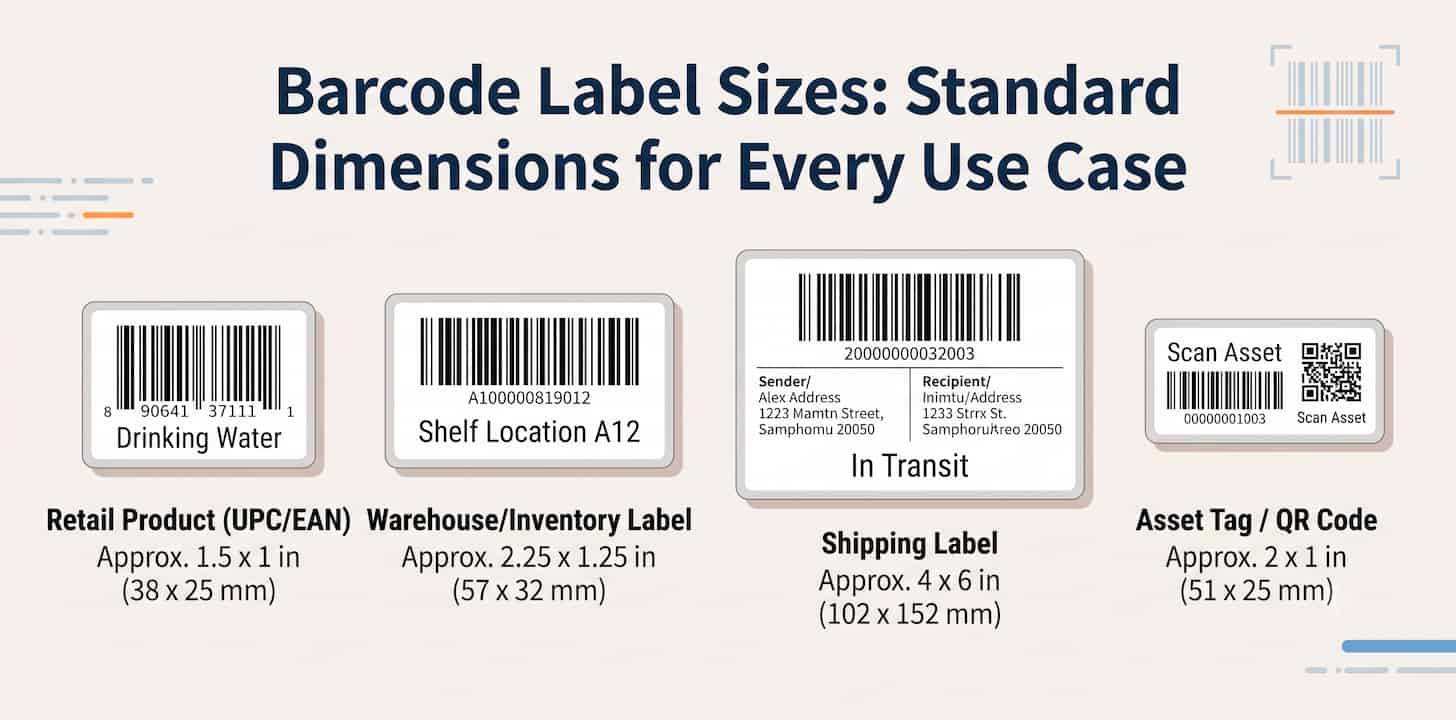
"What size should my barcode label be?" is one of the most common questions in any labeling project — and one of the most common reasons printed barcodes fail to scan.
This guide gives you actual numbers: the minimum size for retail barcodes, the standard thermal label sizes used in warehouses, and which Avery sheets fit which barcode types.
To create the barcode images themselves, use the free Barcode Generator. For the full printing workflow, read How to Print Barcode Labels.
The Short Answer
If you just want a safe starting point:
| Use Case | Recommended Label Size |
|---|---|
| Retail product (UPC/EAN) | At least 1.5 × 1 in (38 × 25 mm) |
| Warehouse / inventory labels | 2.25 × 1.25 in (57 × 32 mm) |
| Shipping labels | 4 × 6 in (102 × 152 mm) |
| Small asset tags | 2 × 1 in (51 × 25 mm) |
| QR codes for phone scanning | At least 0.8 × 0.8 in (2 × 2 cm) |
These sizes work for the large majority of cases. The rest of this guide explains where the numbers come from and when you can go smaller or should go larger.
Retail Barcode Size: UPC-A and EAN-13 Standards
Retail barcodes are the one category with a formal size specification, because they have to scan reliably at any checkout in the world.
The nominal (100%) size of a UPC-A or EAN-13 barcode is:
- 37.29 mm wide × 25.93 mm tall (about 1.47 × 1.02 in), including the quiet zones
The specification allows scaling between 80% and 200% of nominal:
- Minimum (80%): about 29.8 mm (1.17 in) wide
- Maximum (200%): about 74.6 mm (2.94 in) wide
Practical rules for retail products:
- Do not shrink below 80%. Undersized retail barcodes are a leading cause of checkout scan failures and retailer complaints.
- Scale proportionally. Shrinking to 80% means shrinking width and height together, not squeezing one dimension.
- Avoid cutting bar height ("truncation") to save label space. Shorter bars force cashiers to aim precisely, which slows checkout and fails on omnidirectional scanners.
- When in doubt, print at 100%. Nominal size exists because it works everywhere.
If you are still deciding between UPC-A and EAN-13, read Product Barcodes 101: UPC-A vs. EAN-13.
Standard Thermal Label Sizes
Warehouse and inventory operations mostly use direct thermal label rolls. These sizes are industry conventions you can buy from any label supplier:
| Label Size (in) | Label Size (mm) | Typical Use |
|---|---|---|
| 4 × 6 | 102 × 152 | Shipping labels (UPS, FedEx, USPS, Amazon FBA) |
| 2.25 × 1.25 | 57 × 32 | The standard inventory / product label |
| 3 × 1 | 76 × 25 | Shelf labels, longer Code 128 values |
| 2 × 1 | 51 × 25 | Asset tags, small product labels |
| 1.5 × 1 | 38 × 25 | Compact inventory tags |
| 1 × 1 | 25 × 25 | QR codes, very short codes only |
2.25 × 1.25 in is the workhorse. If you are setting up a general-purpose inventory labeling system and are not sure what to order, start there. It fits a Code 128 barcode with a reasonable code length plus a human-readable label line.
4 × 6 in is the shipping standard. Carrier labels, FBA labels, and warehouse logistics almost universally use this size on thermal printers like Zebra and Rollo.
Avery Label Sheets for Barcodes
If you print on a regular office printer instead of a thermal printer, Avery-style sheets are the usual choice. Not every Avery size works for barcodes:
| Avery Template | Label Size (in) | Labels/Sheet | Barcode Suitability |
|---|---|---|---|
| 5160 / 8160 | 2.625 × 1 | 30 | Good default for Code 128 and short codes |
| 5163 / 8163 | 4 × 2 | 10 | Comfortable for UPC/EAN and long Code 128 |
| 5161 | 4 × 1 | 20 | Good for long alphanumeric Code 128 values |
| 22805 | 1.5 × 1.5 | 24 | QR codes |
| 5167 | 1.75 × 0.5 | 80 | Too small for most 1D barcodes — avoid |
Avery 5160 is the most common label sheet in offices, and it works well for inventory barcodes. For retail UPC/EAN labels, 5163 gives you room to stay near nominal size.
For the step-by-step layout workflow, read How to Make Barcode Labels in Word.
How Code Length Affects Label Size
Code 128 has no fixed size, which trips people up: the more characters you encode, the wider the barcode gets.
Two things determine the printed width:
- Number of characters.
BIN-A12produces a much narrower barcode thanWAREHOUSE-EAST-SHELF-A12-POSITION-04. - Bar width (X-dimension). The narrowest bar should generally stay at or above 10 mil (0.25 mm) for reliable scanning with common handheld scanners. Squeezing a long code onto a small label pushes bars thinner than this, and scan rates drop fast.
Practical consequences:
- Keep codes short.
A12-04scans on a 1.5 × 1 in label; a 30-character code does not. Encode a short ID and keep descriptive detail in your database or in the human-readable label line. - Match label width to your longest code, not your average one. One overlong SKU in a batch will fail while the rest scan fine.
- If your codes must be long, use a wider label (3 × 1 in or 4 × 1 in) rather than shrinking the barcode.
QR Code Size
QR codes follow a different rule because they are usually scanned by phone cameras at varying distances.
The common rule of thumb: minimum size ≈ scanning distance ÷ 10.
- Scanned from 20 cm (hand-held product): at least 2 × 2 cm
- Scanned from 1 m (poster, shelf sign): at least 10 × 10 cm
Two more factors:
- Data density. The more data inside, the finer the modules, and the bigger the printed code must be. A short URL scans at smaller sizes than a long text block.
- Quiet zone. Leave a white margin of at least 4 modules around the code.
Don't Forget the Quiet Zone
Every size in this guide assumes the quiet zone — the blank margin around the barcode — is intact.
For 1D barcodes like UPC, EAN, and Code 128, the quiet zone should be roughly 10 times the width of the narrowest bar on each side. In practice: never let text, borders, or the label edge touch the bars, and never crop the white margin off the exported image.
A correctly sized barcode with a missing quiet zone will still fail. This is covered in more detail in the printing guide.
ITF-14 Carton Barcodes Are Bigger on Purpose
ITF-14 barcodes on shipping cartons are printed much larger than retail barcodes, often with a thick black frame (bearer bars) around them.
The size exists for a reason: carton barcodes are scanned in motion, at a distance, on rough corrugated cardboard. If you are printing ITF-14 for cases and cartons, do not shrink it to retail-label size — give it generous space on the carton face and test scan on the actual cardboard, since corrugate absorbs ink and can blur fine bars.
Recommended Workflow
- Decide the label size from the tables above based on your use case.
- Generate the barcode with the Barcode Generator — for a whole batch, use the bulk workflow.
- Export PNG for label templates or SVG for design layouts (comparison here).
- Place the barcode on the label without stretching, keeping the quiet zone.
- Print one sample at final size and test scan before committing to a full batch.
Related Barcode Guides
- Create barcode images online: Free Barcode Generator
- Print labels correctly: How to Print Barcode Labels
- Lay out label sheets in office software: How to Make Barcode Labels in Word
- Generate barcodes in bulk: Bulk Barcode Generator
- Understand retail barcode formats: Product Barcodes 101
Final Thoughts
Barcode label size is not guesswork. Retail UPC/EAN barcodes have a defined range (80%–200% of the 37.29 × 25.93 mm nominal size), warehouses run on a handful of standard thermal sizes with 2.25 × 1.25 in as the default, and Code 128 width is driven by how many characters you encode.
Pick the size before you design the label, keep codes short, protect the quiet zone, and test scan one sample at final size. Use the free Barcode Generator to create the barcode images as PNG or SVG.
Frequently Asked Questions
What is the standard barcode label size?
There is no single standard for all barcodes. For retail UPC/EAN, the nominal size is 37.29 × 25.93 mm (about 1.47 × 1.02 in). For inventory labels, 2.25 × 1.25 in is the most common thermal label size. For shipping, 4 × 6 in is standard.
What is the minimum size for a UPC barcode?
80% of nominal — about 29.8 mm (1.17 in) wide including quiet zones, scaled proportionally in height. Going smaller risks checkout scan failures.
What size label should I use for inventory barcodes?
2.25 × 1.25 in (57 × 32 mm) thermal labels are the common default. Use 3 × 1 in or wider if your Code 128 values are long.
What paper size are barcode labels printed on?
Thermal printers use label rolls in sizes like 4 × 6 in and 2.25 × 1.25 in. Office printers use letter-size Avery sheets such as 5160 (2.625 × 1 in, 30 per sheet) or 5163 (4 × 2 in, 10 per sheet).
Can a barcode be too small to scan?
Yes. When bars get narrower than roughly 10 mil (0.25 mm), common scanners start to fail. Long Code 128 values on small labels are the most frequent cause.
How big should a QR code be?
Rule of thumb: scanning distance divided by 10. A QR code scanned from 20 cm should be at least 2 × 2 cm; from 1 m, at least 10 × 10 cm.
Does the quiet zone count as part of the label size?
Yes. The blank margin around the bars must fit on the label. When choosing a label size, allow roughly 10 narrow-bar widths of white space on each side of a 1D barcode.