Multimedia processing on the web is making rapid strides. With the advent of the WebCodecs API combined with WebAssembly (WASM), the promise of heavy-duty, client-side video processing utilizing dedicated hardware has finally become a reality.
But theory is one thing; how does this technology perform in practice? To find out, I ran a heavy-duty stress test: using a custom-built video compression tool, running entirely within the browser, to process a 1080p file weighing over 300MB. The results offered a fascinating technical lesson on how the modern browser interacts with device hardware.
1. The Real-World Testing Environment
Instead of creating a sterile benchmark environment (closing all apps, clearing RAM), I decided to run the test exactly how most of us work daily:
- Test Browser: Chrome Version 150.0.7871.187 (Official Build) (arm64).
- Device: MacBook Air M3, 16GB RAM (Fanless).
- Multitasking: The browser had 5-6 other active work tabs, running concurrently with Firefox (running Slack) on a secondary monitor.
- Input Data: A highly detailed academic video from the Computerphile channel ("How AI 'Understands' Images (CLIP)"). Duration: 18 minutes. Format: MP4 1080p. Original size: 327MB.
The goal of this test was to see how effectively and stably the WebCodecs API could utilize Hardware Acceleration when the 16GB of unified memory is heavily shared with multitasking workloads.
2. The Processing Phase: The Power of Hardware Acceleration
As soon as the file was loaded into the tool and initiated, the processing was completely smooth, causing zero lag or stuttering across the other active Chrome tabs.
This is the killer feature of WebCodecs for modern formats (like MP4): Instead of relying on the CPU to calculate video encoding via software (which would easily freeze the browser), the WebCodecs API directly invokes the computer's dedicated Media Engine to handle the encode/decode tasks.
Because of the fanless design, the entire bottom chassis of the Mac M3 became quite hot throughout the process. This is clear physical evidence that the hardware (specifically the Media Engine) was being pushed to its limits to continuously shuffle data buffers between the browser environment and the hardware accelerator.
Technical Note on the Processing Architecture: To optimize the tool's performance, I designed a Dual-Engine processing logic. With the MP4 video in this test, the system automatically routes the pipeline to WebCodecs to leverage hardware acceleration. However, if you upload legacy formats not supported by WebCodecs (e.g.,
.avi), the tool automatically triggers a Fallback mechanism, seamlessly switching to FFmpeg running on pure WebAssembly. When this FFmpeg pipeline is active, the CPU must bear 100% of the computational load (Software Encoding). At that point, the compression takes significantly longer, and the device gets truly "scorching hot" rather than just quite hot.
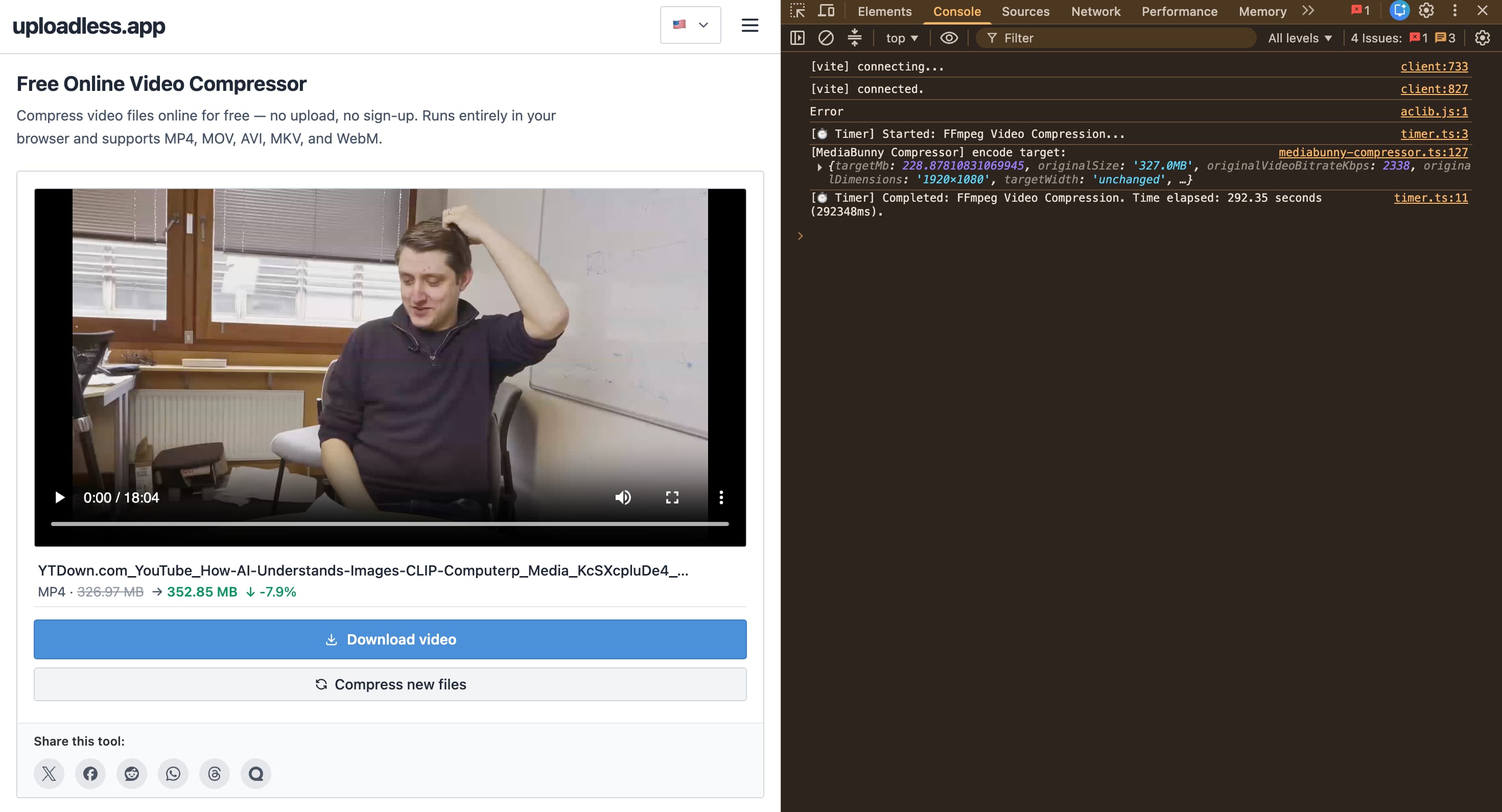
Looking at the DevTools console screenshot for this MP4 test, we recorded the following metrics:
| Metric | Measurement Result |
|---|---|
| Time Elapsed | 292.35 seconds (~4.8 minutes) |
| Original File Size | 326.97 MB (327.0MB) |
| Target Size | ~228.87 MB |
| Actual Output Size | 352.85 MB |
| Optimization Ratio | -7.9% (The file got larger!) |
The browser worked relentlessly for under 5 minutes to complete the encoding task. But the biggest twist lies in the output size: Although the algorithm targeted a file size of 228MB, the final output bloated by nearly 8%.
3. Technical Analysis: Why Did the File Get Larger?
From a software engineering perspective, this "self-destruct" result is an excellent demonstration of a fundamental principle: Video compression is math, not magic.
This file size discrepancy stems from two core technical factors:
- YouTube's Superior Compression Standards: The input video was downloaded directly from YouTube. Google's massive server infrastructure utilizes the most complex and advanced encoding standards available (like VP9 or AV1) to squeeze out every single byte. The original 327MB file had essentially reached the absolute maximum compression limit for 1080p content.
- The Nature of Re-encoding: When the WebCodecs tool operates, it must decode that heavily compressed video stream, then repackage and re-encode it into the standard H.264 format to ensure universal device compatibility. To maintain an equivalent visual quality from an already tightly packed source, the encoder is forced to allocate a higher Bitrate than YouTube's highly optimized standard. The inevitable consequence is a bloated file size.
The browser crunched numbers continuously for 292 seconds just to prove one undeniable fact: You cannot use a standard browser-based encoder to shrink a file that has already been optimized to the extreme by Google's multi-billion-dollar servers.
4. Conclusion: The Real-World Use Case for Browser-Based Compression
This test successfully confirms the maturity of the WebCodecs API in stably processing a relatively heavy multimedia file directly in the browser. However, it also clearly draws the boundaries of this technology.
In reality, a browser-based video compression tool is not built to re-compress ripped videos from the internet, and it is certainly not meant to grind through GB-sized raw camera files (you would be waiting forever if you tried forcing a browser to do the job of dedicated desktop software like Premiere or Handbrake).
The true power and perfect use-case of this tool lie in its convenience, instantly breaking down everyday file size barriers.
This is for when you've just shot a quick video on your iPhone or Android and need to send it immediately to a client or partner, but get blocked by the tiny attachment limits of messaging apps like WhatsApp, Line, or standard email clients. For these unoptimized, short, and raw videos, the smart Dual-Engine architecture will squeeze the file down to a safe, shareable size in the blink of an eye.
Need to urgently send a video via WhatsApp but getting a "File too large" error?
Try dragging and dropping your file into our tool. The system will automatically analyze the format and trigger the optimal hardware processing pipeline to shrink the file size while retaining visual clarity. The entire encoding process happens 100% right in your browser—blazing fast, absolutely secure, and requiring zero server uploads.
👉 Overcome file limits instantly with our Free Online Video Compressor here!